


How to Give Employees Access to AI: A Complete Guide for Managers and Business Leaders
Artificial intelligence has moved from experimental technology to essential business tool. Your employees are already using AI—whether you know it or not. The question isn't whether to give employees access to AI, but how to do it safely, strategically, and cost-effectively.
Approximately 91% of employees reported that their organizations were using at least one form of AI technology as of 2026. Yet only 44% of companies had a policy in place that specifically covers employee use of generative AI. This gap creates serious security risks and missed opportunities for productivity gains.
This guide walks you through the practical decisions managers face when enabling AI across their workforce. You'll learn which tools to provide, how to manage permissions, how to protect sensitive data, and how to control costs while maximizing value.

Key Takeaways
-
Start with approved tools, not blanket bans: If you restrict access to AI tools, employees won't just stop using generative AI—they'll start looking for workarounds using personal devices and unsanctioned accounts. Create a pre-approved list instead.
-
Training is your top priority: 48% of employees say formal training is the most important factor for AI adoption. Without proper training, even the best tools will fail to deliver results.
-
Security requires centralized management: Giving employees access without proper access controls, data protection, and monitoring creates compliance nightmares. Workspace management platforms solve this problem by centralizing permissions and usage tracking.
Why Giving Employees Access to AI Matters Now
The business case for AI access is straightforward. Four out of ten workers who use AI tools at work say they've been very or extremely helpful in saving them time, while 29% report that it's raised the quality of their work.
But the urgency goes beyond productivity gains. AI technology is advancing at record speed—ChatGPT was released about two years ago, and OpenAI reports that usage now exceeds 300 million weekly users. Your competitors are already leveraging these tools.
The real risk isn't moving too fast. It's moving too slow.
The Shadow AI Problem
Here's what's actually happening in your organization right now. More than half of employees say they would use AI tools without formal approval, and nearly one-third keep their use hidden from employers.
This "shadow AI" creates three major problems:
-
Data leakage: Employees paste confidential information into public AI tools without understanding the risks.
-
Compliance violations: Unmanaged AI use can violate industry regulations around data handling.
-
Missed opportunities: When AI use happens in the shadows, you can't capture best practices or scale what works.
The solution isn't to ban AI. It's to provide approved alternatives with proper guardrails.

Step 1: Choose Which AI Tools to Provide
Not all AI tools are created equal. Your first decision is determining which tools deserve official approval and company resources.
Categories of AI Tools
General-purpose AI assistants like ChatGPT, Claude, and Google Gemini handle writing, research, brainstorming, and general problem-solving. ChatGPT remains the dominant force, with over 65% of workers who use AI relying specifically on OpenAI's models.
Specialized AI tools serve specific functions. These include AI for customer service, code generation, data analysis, design, and content creation. AI tools in HR are most common in recruiting (27%), HR technology (21%), learning and development (17%), and employee experience (14%).
Enterprise vs. consumer versions represent a critical distinction. Consumer-grade tools lack the security controls, data privacy protections, and administrative features businesses need. Enterprise-grade solutions give organizations greater security and control.
Building Your Approved AI List
Start by identifying your highest-value use cases. Where do employees spend the most time on repetitive tasks? Which departments handle the most data-intensive work?
Create a cross-functional evaluation team. Create a cross-functional team tasked with evaluating tools and giving feedback to IT about which tools promise real value. Include representatives from IT, security, legal, and key business units.
Evaluate tools based on these criteria:
-
Security features: Data encryption, compliance certifications, and privacy controls.
-
Integration capabilities: How well the tool connects with your existing systems.
-
Cost structure: Per-user pricing, usage limits, and enterprise discounts.
-
Support and training: Vendor-provided resources and documentation.\

The AI App Store Approach
To simplify AI access and encourage employee use, companies like Zoetis set up a generative AI app store where employees can apply for tool licenses and learn about effective and responsible use.
This approach provides several advantages. Employees can browse approved options and request access through a single portal. IT maintains visibility into who's using what. The organization can track which tools deliver the most value.
Step 2: Manage Access and Permissions Properly
Once you've selected tools, the next challenge is controlling who can access what—and under what conditions.
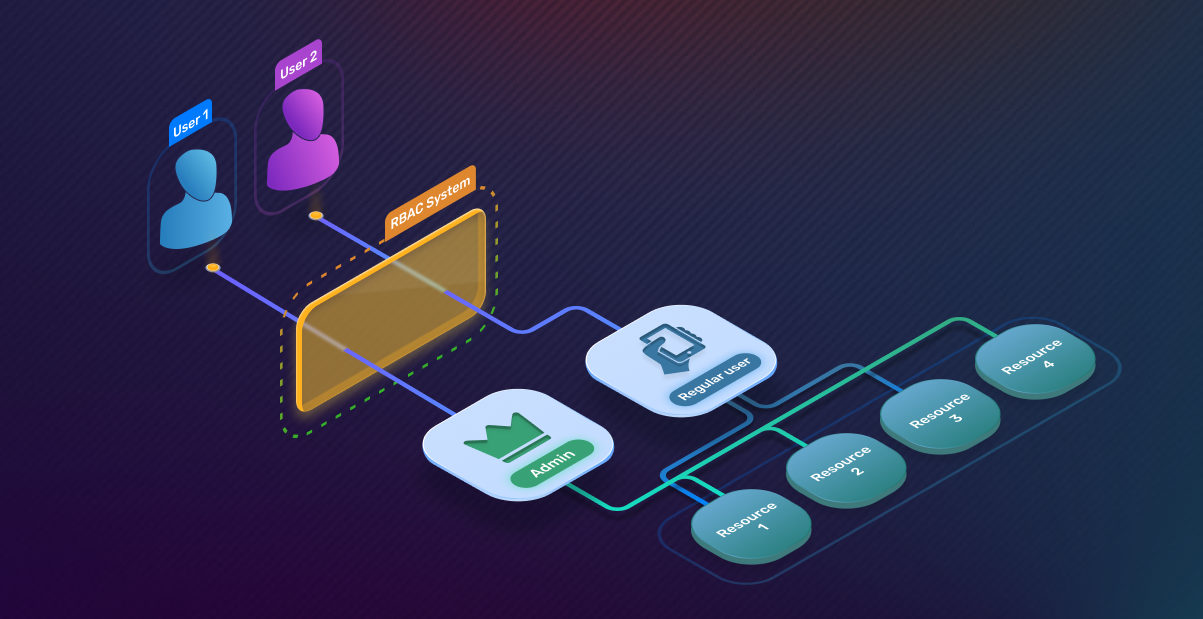
Role-Based Access Control
Not every employee needs access to every tool. Ensure role-based access permissions are in place, so employees can only access the data they need.
Create access tiers based on job functions. Marketing teams might need content generation tools, while developers require code assistants. Finance teams need data analysis capabilities with strict confidentiality controls.
Document clear criteria for each access level. What job titles or departments qualify? What training must employees complete first? What data handling restrictions apply?
Self-Service Access Requests
This approach balances autonomy with oversight. Employees can request the tools they need without waiting for IT to anticipate every use case. Managers can review and approve requests based on business justification.
Set clear expectations around the approval process. Define response time commitments, required justifications, and escalation procedures for denied requests.
Usage Quotas and Limits
Usage quotas should be set based on actual requirements, not arbitrary restrictions.
Many AI tools charge based on usage volume. Setting appropriate limits prevents runaway costs while ensuring employees have sufficient capacity for legitimate work.
Monitor usage patterns to identify outliers. Unusually high usage might indicate either a power user who needs additional capacity or inappropriate use that requires intervention.
Step 3: Implement Data Security and Compliance Controls
AI tools can inadvertently expose your most sensitive information. Security must be built into your access strategy from day one.
The Data Leakage Risk
This happens more often than you think. An employee needs to draft a client proposal fast, so they paste in an old client agreement and ask ChatGPT to summarize it—that data is retained or processed in a way the company can't control. Free AI tools aren't always designed with corporate privacy or compliance in mind.
Create Clear Usage Policies
Draft an AI Acceptable Use Policy that clearly outlines what can and can't be shared with AI tools.
Your policy should address:
-
Prohibited data types: Customer information, financial records, proprietary code, trade secrets, and personal employee data.
-
Approved use cases: Specific examples of appropriate AI applications for different roles.
-
Data handling procedures: How to sanitize information before using AI tools.
-
Consequences: Clear outcomes for policy violations.
A good AI workplace policy should be simple, easy to follow, and fit your organization's use of AI. The goal is to give employees clarity and confidence, not overwhelm them with complex rules. A strong policy explains where AI fits in daily work, how to use it responsibly, and the boundaries that protect your business.
Technical Security Controls
Policy alone isn't enough. You need technical safeguards that prevent data exposure.
Configure your approved AI tools with enterprise-grade security features. This includes data residency controls, encryption standards, and audit logging capabilities.
Roll out Mobile Device Management (MDM) tools or endpoint security software that supports BYOD environments. This ensures security controls extend to personal devices employees use for work.
Compliance Considerations
Compliance violations can occur when employees utilize AI tools to manage regulated data, such as HIPAA, GDPR, or financial information, without implementing the proper data security measures or data handling protocols.
Identify which regulations apply to your organization. Map out where AI use intersects with regulated data. Document how your controls address specific compliance requirements.
As of February 2026, 19 of the most populous states have enacted AI laws or regulations that pertain to employer or employment AI usage. A surprising 57% of HR professionals who work in those states reported that they are not aware of those policies.

Step 4: Train Employees on Effective AI Use
Access without training is like handing someone car keys without teaching them to drive. Training determines whether your AI investment delivers returns or creates chaos.
Why Training Is Non-Negotiable
Nearly half of employees say they want more formal training and believe it is the best way to boost AI adoption. Yet employees are not getting the training and support they need—more than a fifth report that they have received minimal to no support.
The consequences of inadequate training are severe. The most common AI adoption challenge is "unclear use case or value proposition." Even among those who report using AI, only 16% strongly agree that the AI tools provided by their organization are useful for their work.
What to Include in AI Training
Foundational AI literacy covers what AI can and cannot do, how it works at a basic level, and common misconceptions. Every employee needs this baseline understanding.
Tool-specific training teaches employees how to use the specific AI platforms you've approved. This includes interface navigation, prompt engineering basics, and feature walkthroughs.
Role-based applications show employees how AI applies to their specific job functions. Marketing teams learn content creation techniques. Customer service learns how to use AI for faster response times. Developers learn code generation best practices.
Security and ethics training addresses data handling, recognizing AI limitations, verifying outputs, and identifying potential biases. Require human review of all deliverables that use AI output. Given AI's tendency to "hallucinate" (generate confident falsehoods), make clear that employees are fully accountable for accuracy, compliance, and safety.
Training Delivery Methods
Host training sessions that give employees learning experiences in low-stakes situations. Hands-on practice builds confidence faster than passive learning.
Record training sessions and house them on your intranet platform for access at a later date. This ensures employees who miss live sessions can still get trained.
Create internal AI champions. Peer mentoring programs connect AI-proficient employees and expand their skills. Employees who create new and innovative AI workflows should be recognized, rewarded, and designated as internal company experts.
Measuring Training Effectiveness
Track completion rates, but don't stop there. Measure actual usage of approved tools post-training. Survey employees about confidence levels and perceived value.
Experience changes perception. Effective training creates that experience.

Step 5: Control Costs While Scaling AI Access
AI tools can get expensive fast. Cost management requires upfront planning and ongoing monitoring.
Understanding AI Pricing Models
Most enterprise AI tools use one of three pricing structures:
-
Per-user subscriptions: Fixed monthly or annual fees per employee with access.
-
Usage-based pricing: Charges based on API calls, tokens processed, or compute time.
-
Tiered plans: Different feature sets at different price points.
Usage quotas should be set based on actual requirements, not arbitrary restrictions. Start with conservative allocations and adjust based on demonstrated need.
Monitoring and Optimization
Regular usage reviews identify opportunities to optimize spending. Are you paying for licenses that go unused? Are certain departments consistently hitting usage limits while others barely touch their allocations?
Calculating ROI
Businesses report a strong average return of $3.70 for every $1 invested in generative AI, making it one of today's highest-ROI tech investments.
Track both hard and soft benefits. Hard benefits include time saved on specific tasks, increased output volume, and reduced error rates. Soft benefits include improved employee satisfaction, faster onboarding, and enhanced decision-making quality.

Step 6: Address Employee Concerns and Resistance
Job Security Fears
One out of three workers are worried that their jobs could be replaced by AI. These fears are real and must be addressed directly.
81% of business owners see AI as augmenting their workforce, not replacing it. AI is removing tedious, repetitive tasks, which allows employees to focus on higher-value work like strategy, customer relationships, and creative problem-solving.
Communicate this message clearly and repeatedly. Show concrete examples of how AI will enhance rather than eliminate roles. Involve employees in identifying which tasks they'd most like AI to handle.
Building Trust Through Transparency
Share success stories from early adopters. Highlight specific examples where AI helped employees accomplish more or made their work easier.

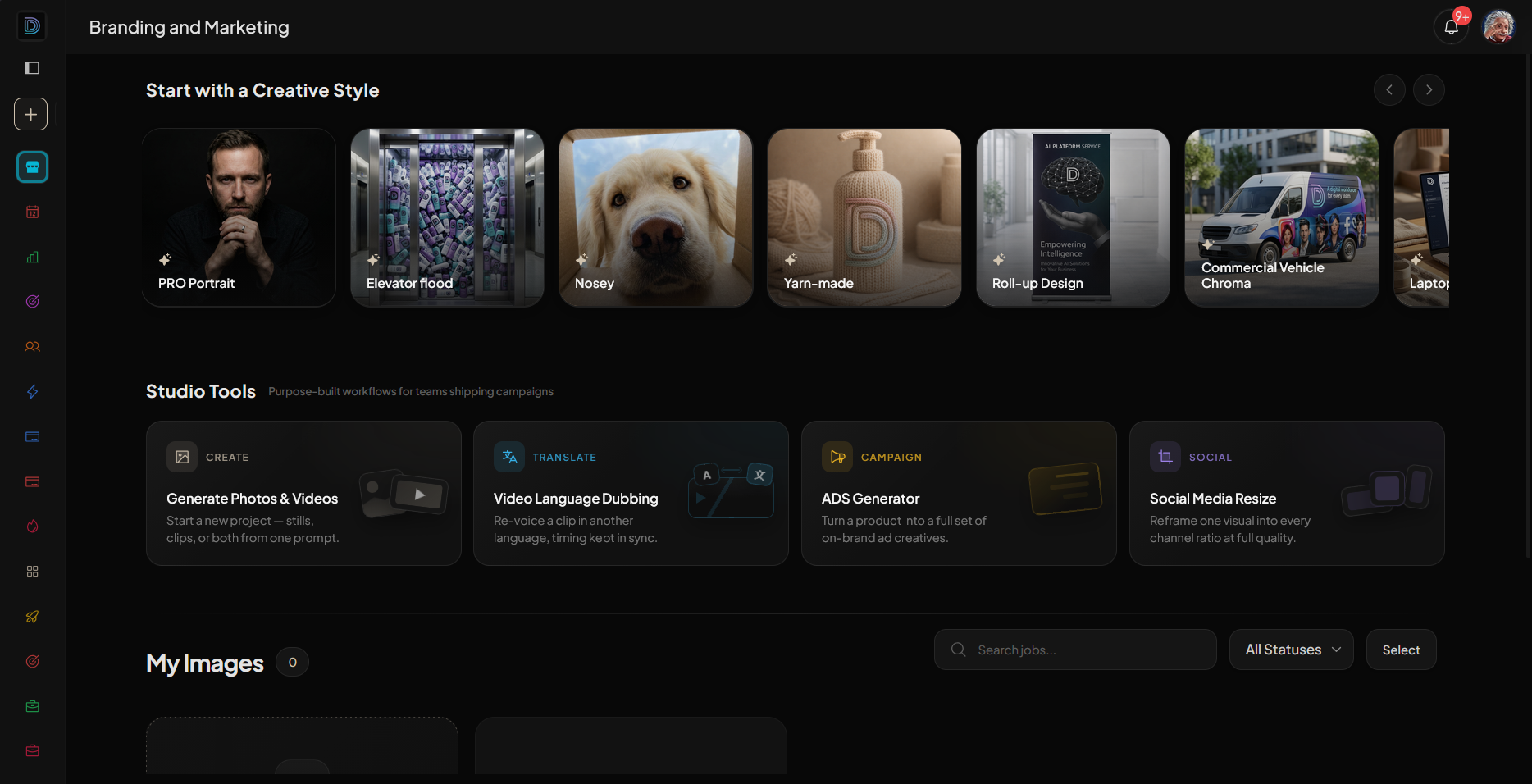
Why DIMA-AI Is the Solution for Workspace and Access Management
Managing AI access across your workforce requires more than just buying licenses. You need centralized control, visibility, and security—without creating administrative bottlenecks.
DIMA-AI provides a comprehensive workspace management platform designed specifically for organizations giving employees access to AI tools. Here's how it solves the key challenges managers face:
Centralized access management lets you provision, monitor, and revoke AI tool access from a single dashboard. No more tracking spreadsheets or manual license assignments.
Role-based permissions ensure employees get access to the right tools based on their job function. You define the rules once, and DIMA-AI enforces them automatically.
Usage monitoring and analytics show you exactly how employees are using AI tools. Identify power users, spot unused licenses, and optimize spending based on real data.
Built-in security controls protect sensitive data through DLP integration, audit logging, and compliance reporting. You get visibility into what data employees are sharing with AI tools.
Cost optimization features help you right-size your AI investments. Track spending by department, set budget alerts, and identify opportunities to consolidate licenses.
Whether you're just starting to give employees AI access or scaling an existing program, DIMA-AI provides the infrastructure you need to do it safely and efficiently.
Learn more about DIMA-AI's workspace management solutions
Frequently Asked Questions
How do I know which employees should get AI access first?
Start with knowledge workers in high-volume roles where AI can deliver immediate impact. AI use in the workplace is most prevalent in knowledge-based industries. Employees in technology, finance and higher education report the highest levels of AI use. Sales, customer service, marketing, and content creation roles typically see the fastest returns.
What if employees resist using AI tools?
Recent cross-industry research shows that 31 percent of U.S. knowledge workers admit to actively working against their company's AI initiatives. Meanwhile, while 85 percent of leaders and 78 percent of managers regularly use gen AI, only 51 percent of workers do. The solution is addressing core psychological needs through proper training, clear communication about benefits, and involving employees in implementation decisions.
How much should I budget for employee AI training?
Training investment varies based on organization size and complexity. Formal AI training programs deliver measurable ROI of $3.70 per dollar invested. Plan for both initial training and ongoing learning resources. Most organizations allocate 10-15% of their total AI budget to training and change management.
Can I just let employees use free AI tools instead of paying for enterprise versions?
Free consumer AI tools lack critical security features, administrative controls, and compliance capabilities. Unauthorized use of generative AI can expose your organization to significant risk—primarily the leakage of confidential and proprietary information. The cost of a data breach far exceeds enterprise licensing fees.
How long does it take to roll out AI access across an organization?
Implementation timelines depend on organization size and complexity. Small companies (under 100 employees) can complete rollout in 4-8 weeks. Mid-size organizations (100-1000 employees) typically need 3-6 months. Large enterprises often take 6-12 months for full deployment. Phased approaches that start with pilot departments deliver faster initial value.
Conclusion
Giving employees access to AI is no longer optional—it's a competitive necessity. The organizations that thrive will be those that enable AI use strategically, with proper security, training, and governance.
Start by selecting approved tools that meet your security requirements. Implement clear access controls and usage policies. Invest heavily in training—it's the single biggest factor in successful adoption. Monitor usage to optimize costs and identify best practices.
Most importantly, address this challenge now rather than later. Leaders must move with alacrity, or they will fall behind. Your employees are already using AI. The question is whether you'll provide them with the right tools, training, and guardrails to do it effectively.
With platforms like DIMA-AI, you can centralize access management, enforce security policies, and scale AI adoption across your workforce without creating administrative chaos. The technology exists to do this right. The only question is whether you'll act on it.
 DIMA
DIMA